Understand session usage
Use session usage when a conversation is becoming long, a model feels expensive, or you want to understand how much context OpenCode is carrying.
Open the usage sheet
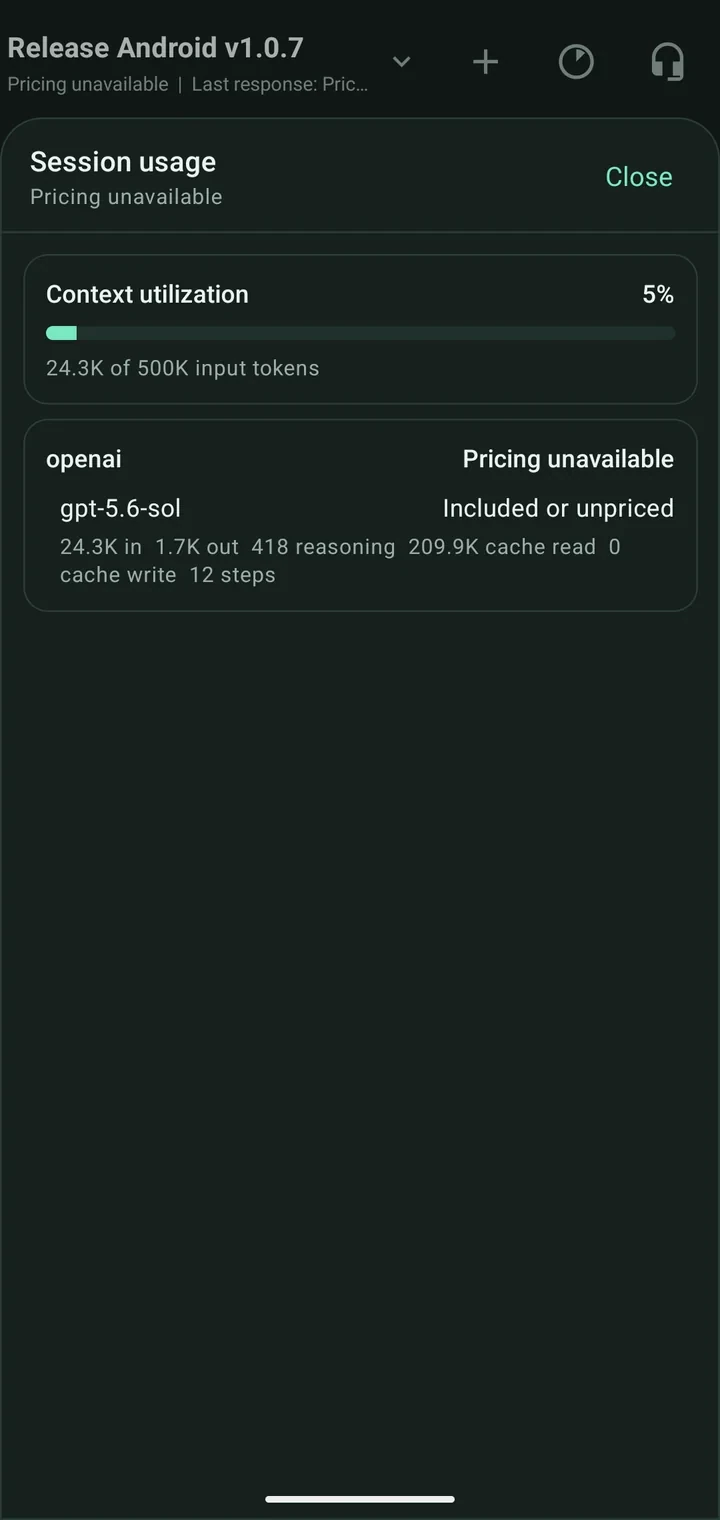
Tap the usage indicator in the Chat header. The sheet summarizes the current session and active model.
Read the numbers
- Context utilization is the portion of the model's input window currently represented by session input.
- Input and output tokens measure text sent to and returned by the model.
- Reasoning tokens are reported separately when the provider supplies them.
- Cache read/write shows reused or newly cached context when supported.
- Steps counts recorded assistant processing steps.
- Estimated cost appears only when the server has usable pricing metadata.
“Pricing unavailable” does not mean the request was free. It means the app cannot calculate a reliable amount. “Included or unpriced” may represent subscription-included usage or missing provider pricing.
Use the information
- Start a fresh session when unrelated history is consuming context.
- Keep one session focused on one outcome.
- Choose a smaller model for routine follow-ups when appropriate.
- Treat cost as an estimate and use the provider's billing dashboard as the source of truth.
Next: Manage sessions or configure models.